| .. | ||
| infra | ||
| jellyfin | ||
| lemmy | ||
| mastodon | ||
| nextcloud | ||
| sites | ||
| wordpress | ||
| .gitignore | ||
| moni0_proxy_host.png | ||
| moni1_proxy_host.png | ||
| README.md | ||


multitenant
nginx-proxy-manager
docker network create infra
Admin: http://127.0.0.1:81/
admin@example.com
changeme
Wordpress
We need to add domain names in our /etc/hosts file:
127.0.0.1	moni0.codecompost.nl
127.0.0.1	moni1.codecompost.nl
And pass a project name to the docker-compose command:
docker-compose -p moni0 up --build --force-recreate -d
This will prepend moni0_ to the containers (and add a _1 apparently)
Creating network "moni0_internal_network" with the default driver
Creating volume "moni0_wordpress" with default driver
Creating volume "moni0_db" with default driver
Creating moni0_db_1        ... done
Creating moni0_wordpress_1 ... done
In the Nginx Proxy Manager, we can add the proxy host:
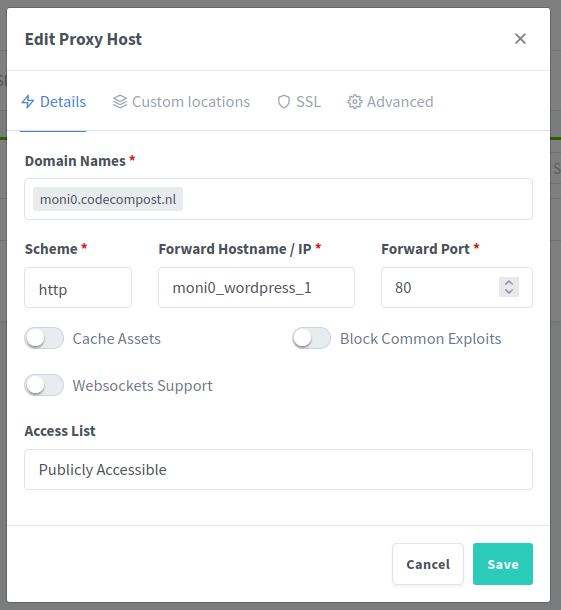
We can go ahead and start a second wordpress with:
docker-compose -p moni1 up --build --force-recreate -d
And then you can configure it like this:
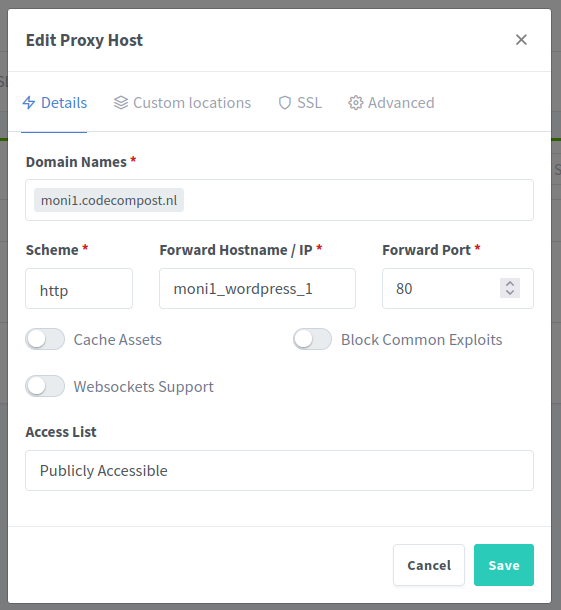
Make sure that moni1.codecompost.nl is also in your hosts file, otherwise it won't work!